VRC Glasses System 【VRCメガネシステム】
- ダウンロード商品¥ 500
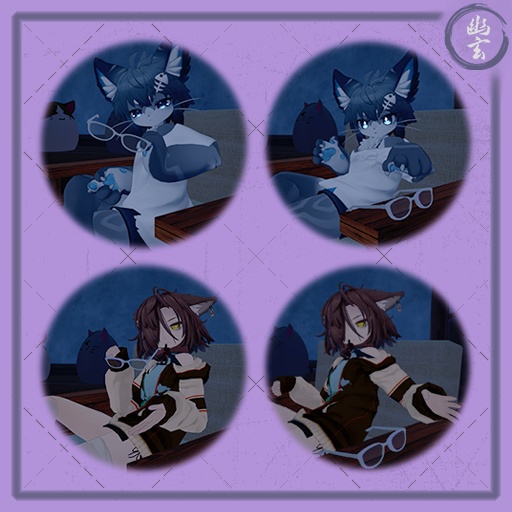
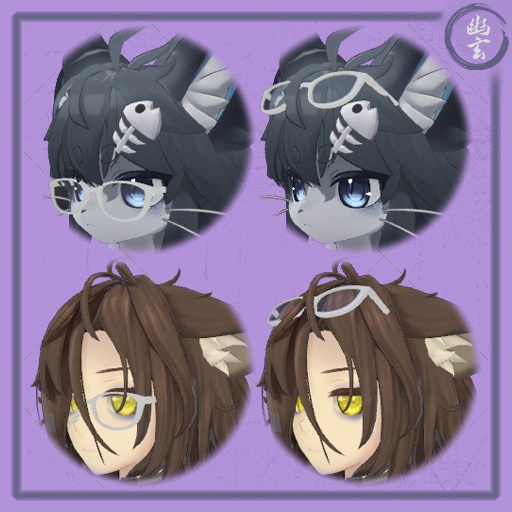
Twitter: https://x.com/Yugenki_VRC Test the Glasses System: https://vrchat.com/home/avatar/avtr_ac65df1a-f742-4596-b256-9a231cabd165 With this user-friendly installation tool, you can effortlessly transition your personal glasses from your face to your head, hands, or even leave them within the virtual world! This package require: - VRCFury or Modular Avatar (Used for installation) * https://vrcfury.com/download/ * https://modular-avatar.nadena.dev/ - 7 Parameters. - 5 Contact Receivers. - 2 Contact Senders. - 1 VRC Parent Constraint (Quest Compatible!) User Instructions: - All the interactions are made using the Gesture "Gun" (Number 6 of the "GestureLeft" and "GestureRight" parameters). https://youtu.be/Lf9o6TWg6sY 00:00 Demostration 00:26 Radial Menu 00:46 Installation Instructions 03:32 Change Glasses [06/03/2024] - (1.01) Added Modular Avatar option to Install Glasses, it uses same process as VRCFury. [06/04/2024] - (1.02) Created an extra prefab for big avatars, Contacts were rezised for that version. [08/18/2024] - (1.03) Adapted to use VRC Parent Constraint (Now is Quest Compatible!) [11/16/2024] - (1.04) Added a new toggle to enable/disable contacts, to avoid accidentally grabbing the glasses! --------------------------------------------------- Twitter: https://x.com/Yugenki_VRC グラスシステムをテスト: https://vrchat.com/home/avatar/avtr_ac65df1a-f742-4596-b256-9a231cabd165 この使いやすいインストールツールを使えば、あなたの個人用グラスを顔から頭や手、さらにはバーチャル世界に残すことさえ簡単にできます! このパッケージに必要なもの: - VRCFury または Modular Avatar(インストール用) * https://vrcfury.com/download/ * https://modular-avatar.nadena.dev/ - 7つのパラメータ - 5つのコンタクトレシーバー - 2つのコンタクトセンダー - 1つのVRCペアレントコンストレイント(クエスト互換!) ユーザー手順: - すべてのインタラクションはジェスチャー「ガン」("GestureLeft" および "GestureRight" パラメータの6番目)を使用して行います。 https://youtu.be/Lf9o6TWg6sY 00:00 デモンストレーション 00:26 ラジアルメニュー 00:46 インストール手順 03:32 グラスの変更 [2024年6月3日] - (1.01) グラスをインストールするためのModular Avatarオプションを追加しました。VRCFuryと同じプロセスを使用します。 [2024年6月4日] - (1.02) 大きなアバター用に追加のプレハブを作成し、そのバージョンのためにコンタクトを再調整しました。 [2024年8月18日] - (1.03) VRCペアレントコンストレイントを使用するように適応しました(クエスト互換になりました!) こちらが日本語訳です: [2024年11月16日] - (1.04) 新しいトグルを追加しました。コンタクトレンズを有効/無効にすることで、誤ってメガネを掴むのを防ぎます!
Installation instructions
Use Instructions: - All the interactions are made using the Gesture "Gun" (Number 6 of the "GestureLeft" and "GestureRight" parameters). 1. Add the Glasses Prefab - If your avatar is big (1.7 or above) i would recommend use the "Big Avatar" prefab version - Place the "Glasses Prefab" at the root of your avatar in the Hierarchy window. 2. Position the Glasses on the Face - Move "MOVE THIS - Glasses Face Position" until the glasses are correctly placed on the avatar's face. - To scale the glasses: - Navigate to "Glasses Prefab" -> "Glasses Container" -> "Glasses" -> "Glasses - REPLACE WITH YOUR GLASSES". - Adjust the scale values in the Inspector window as needed. 3. Set the Parent Constraint for Head Position - Go to Glasses Prefab -> Glasses World Constraint -> Glasses Container. - In the Inspector window, locate the VRC Parent Constraint component. - Change the values to 0 1 0 0 to move the glasses to the head position. 4. Position the Glasses on the Head - Move "MOVE THIS - Glasses Head Position" until the glasses are correctly placed on the avatar's head. 5. Set the VRC Parent Constraint for the Hands - Repeat step 4 and 5 for the left and right hands using the following values for the Parent Constraint: - Left Hand: 0 0 1 0 - Right Hand: 0 0 0 1 - After that set the VRC Parent Constraint to 1 0 0 0 6. Upload or Test the Avatar - When you upload or test the avatar, VRCFury will handle the rest of the installation automatically. Replacing the Glasses: 1. Navigate to the Glasses Component - Go to "Glasses Prefab" -> "Glasses Container" -> "Glasses" -> "Glasses - REPLACE WITH YOUR GLASSES". 2. Position Your Glasses - Place your own glasses in the same location as "Glasses - REPLACE WITH YOUR GLASSES". 3. Adjust Placement - Move/scale your glasses to occupy the same space accurately. 4. Remove the Placeholder Glasses - Delete "Glasses - REPLACE WITH YOUR GLASSES".
インストール手順
使用手順: - すべてのインタラクションはジェスチャー「ガン」("GestureLeft" および "GestureRight" パラメータの6番目)を使用して行います。 1. グラスのプレハブを追加する - あなたのアバターが大きい場合(1.7以上)、"Big Avatar" プレハブバージョンの使用をお勧めします。 - "Glasses Prefab" をヒエラルキーウィンドウでアバターのルートに配置します。 2. グラスを顔に配置する - "MOVE THIS - Glasses Face Position" を移動させて、グラスをアバターの顔に正しく配置します。 - グラスのスケールを調整するには: - "Glasses Prefab" -> "Glasses Container" -> "Glasses" -> "Glasses - REPLACE WITH YOUR GLASSES" に移動します。 - 必要に応じてインスペクタウィンドウでスケール値を調整します。 3. 頭の位置にペアレントコンストレイントを設定する - "Glasses Prefab" -> "Glasses World Constraint" -> "Glasses Container" に移動します。 - インスペクタウィンドウでVRCペアレントコンストレイントコンポーネントを見つけます。 - 値を0 1 0 0に変更して、グラスを頭の位置に移動します。 4. 頭にグラスを配置する - "MOVE THIS - Glasses Head Position" を移動させて、グラスをアバターの頭に正しく配置します。 5. 手のためにVRCペアレントコンストレイントを設定する - 左右の手に対して、以下の値を使用してペアレントコンストレイントを設定します: - 左手: 0 0 1 0 - 右手: 0 0 0 1 - その後、VRCペアレントコンストレイントを1 0 0 0に設定します。 6. アバターをアップロードまたはテストする - アバターをアップロードまたはテストすると、VRCFuryがインストールの残りの部分を自動的に処理します。 グラスを置き換える場合: 1. グラスコンポーネントに移動する - "Glasses Prefab" -> "Glasses Container" -> "Glasses" -> "Glasses - REPLACE WITH YOUR GLASSES" に移動します。 2. 自分のグラスを配置する - 自分のグラスを "Glasses - REPLACE WITH YOUR GLASSES" と同じ場所に配置します。 3. 配置を調整する - 自分のグラスを正確に同じ位置に移動/スケールします。 4. プレースホルダーグラスを削除する - "Glasses - REPLACE WITH YOUR GLASSES" を削除します。